
Cable Standing Hip Abduction (Version 3)
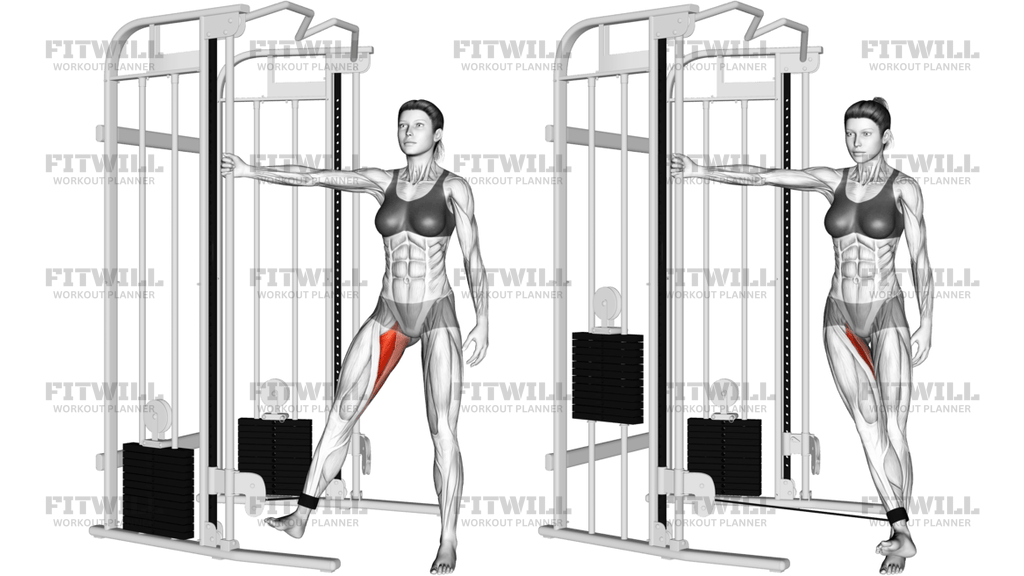
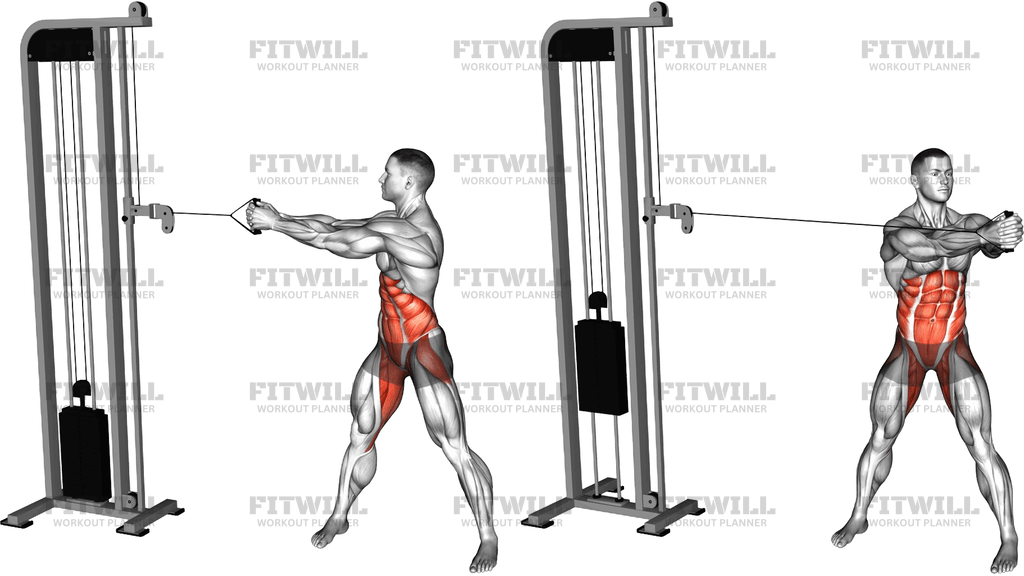
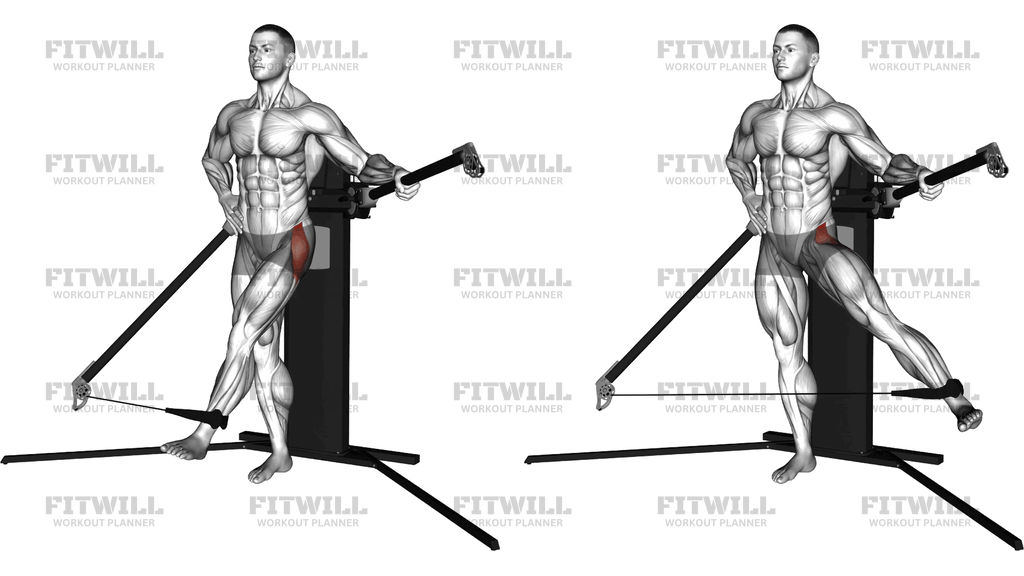
Cable Standing Hip Abduction (Version 3) is a standing single-leg movement that trains the muscles on the outside of the hip as you lift one leg away from your body against direct sideways resistance. An ankle strap is attached to a low pulley on the cable machine, and you stand sideways to the stack with the strap on the far leg. From there, you sweep that leg out and away from the machine in a wide arc, pause briefly at the top, and lower it back across your body under control.
This exercise is a straightforward way to load hip abduction, which is hard to train with heavy resistance using body weight alone. The gluteus medius and the other muscles along the outer hip do most of the lifting, while the glutes as a whole and the standing-leg stabilizers work to keep your pelvis level. Because the cable pulls the working leg back toward the machine, your muscles stay under tension through the entire range, including the moment when the leg crosses in front of your support leg at the bottom of each rep.
Setup matters here more than on most hip exercises. Standing at the correct distance from the pulley keeps the cable angle working with you rather than dragging you off balance, and holding the machine's handle with the near arm gives you a stable anchor so your torso stays upright instead of leaning away from the leg. Keep the strap snug around the ankle, not the calf, so the pull stays on the joint you are trying to move.
Execution is simple but easy to rush. Lift the leg out to the side in a smooth arc, keeping the foot flexed forward or neutral and the knee mostly straight, and stop at a height you can reach without tipping your torso or rotating the pelvis. A small, clean lift with steady tension beats a big swing every time. Control the return so the leg travels back across the midline before the next rep.
People use this movement for glute development, for building single-leg stability that carries over to running, cutting, and squatting, and as a focused accessory on lower body days. It also suits anyone rehabbing or strengthening around the hip in a low-load, controlled setting. Complete all reps on one side, then turn around and strap the other ankle so both sides get the same work.
[ Workout Log & Planner ]
Put your next workout in Fitwill
Keep your plan and training log ready when you are.


Instructions
- Set a single low pulley on the cable machine to roughly ankle height and attach an ankle strap to the end of the cable.
- Strap the cuff securely around your outside ankle, then stand sideways to the machine with that leg closest to the pulley and your feet about hip-width apart.
- Reach across with your near hand to grip the machine's handle or frame for support, and place your other hand on your hip or let it hang at your side.
- Shift your weight onto the leg farthest from the machine so the strapped foot can rest lightly on the floor in front of and across your body, with the cable slightly taut.
- Brace your core and keep your torso tall and square to the front; do not twist your shoulders or lean away from the machine.
- Exhale and sweep the strapped leg out and away from the machine in a smooth arc, keeping the leg nearly straight, until it reaches a comfortable height beside you.
- Pause for a beat at the top, squeezing the outer hip without letting your pelvis tilt or rotate.
- Inhale and lower the leg slowly back across the front of your support leg, resisting the cable's pull the whole way down.
- Complete your reps on that side, then unstrap the cuff, turn to face the opposite direction, and work the other leg for the same number of reps.
Tips & Tricks
- If the weight stack is dragging you toward the machine on every rep, the load is too heavy — drop it until you can finish the set standing tall.
- A crossed-over start position means the cable should already have tension before you lift; if there is slack at the bottom, step closer to the pulley.
- The most common mistake is swinging the leg with momentum instead of driving it out with the hip — a two-second lift with a one-second pause at the top fixes this.
- Watch your support hip: if it drops or juts sideways, you are losing the single-leg stability benefit this exercise provides, so lighten the load and reset.
- Keep the toes of the working leg facing forward or slightly down; turning the foot up and out recruits a different hip pattern and shortens the arc.
- Hold the machine's handle firmly but don't hang off it — the arm is for balance, and leaning hard on it steals work from the standing leg.
- If your outer hip cramps near the top of the rep, that's usually a sign of a brand-new range under load; reduce the height slightly and build up gradually.
- Because each side is trained separately, always start with your weaker leg and match the reps on the stronger side to keep development even.
Frequently Asked Questions
Which muscles does Cable Standing Hip Abduction (Version 3) work?
The gluteus medius and surrounding outer hip muscles do most of the work, with the broader glutes assisting. Your standing leg also works hard to stabilize your pelvis throughout each rep.
Why does the working leg start crossed in front of the support leg?
Starting across the midline lets the leg travel through a longer arc against the cable, so the outer hip works through both the stretched and contracted portions of the movement instead of only the top half.
Is this exercise suitable for beginners?
Yes, as long as the weight is light and the emphasis stays on controlled arcs rather than height. Beginners should hold the machine's handle with a firm grip until standing balance on one leg feels automatic.
How heavy should I go on Cable Standing Hip Abduction (Version 3)?
Choose a weight you can lift out to the side for all reps without leaning your torso or swinging the leg. If your body starts moving to help the leg, the load has exceeded what your hip can control.
Should the strap go on my ankle or my calf?
The strap belongs around the ankle, as shown in the standard setup. A cuff on the calf lengthens the lever and can strain the knee joint rather than challenging the hip.
How far should I lift my leg out to the side?
Lift only as high as you can manage while keeping your torso upright and your pelvis level. Raising the leg past that point shifts the work into trunk side-bending and reduces the challenge to the hip.
Can I do this exercise without a cable machine?
Yes — standing side leg raises with body weight or a mini band around the ankles are common substitutes. The cable version offers the advantage of steady tension in the crossed-over start position, which those options lack.
How many reps and sets should I perform?
Two to four sets of 10 to 15 reps per side works well for most lifters, with a short rest between sides. Because the range is small and the load is limited, higher-rep sets tend to be more productive than chasing heavy weight.
Is it safe for my knees or lower back?
When performed with a snug ankle strap, a controlled arc, and an upright torso, the movement places the emphasis on the hip rather than the knee or spine. If standing on one leg causes discomfort, hold the handle more firmly and reduce the range or the weight.